


The Publer mobile app lets you create and schedule social media posts, organize your media, collaborate with your team, and check your results wherever you are.
Your next content idea, team approval, or last-minute edit won’t always happen at your desk. Whether you’re a creator managing your own accounts or part of a team juggling several brands, your content plan can come with you.
With over 1 million downloads and a 4.7 out of 5 rating on both the App Store and Google Play, Publer helps you manage your social media wherever you are.
And now, app reminders give you even more publishing flexibility. Plan and schedule your posts in Publer, then finish them in the social app with trending sounds, Story stickers, and other native features.
Ready to take your content plan with you? Download the Publer app and follow along.
TL;DR: The 30-Second Scroll
Here for the quick version? Here’s what you can do with the Publer mobile app:
- Schedule now, add the finishing touches later: Plan posts with app reminders, then add music, stickers, and other native features in the social app for free.
- Multiple networks, one calendar: Online adults use an average of 6.75 social platforms per month. Create posts, save drafts, and manage your schedule across accounts with Publer.
- Keep ideas and visuals within reach: Save inspiration in the Ideas Board and organize your content in the Media Library.
- Keep approvals moving: Review posts, leave feedback, and collaborate across Workspaces from your phone.
- Check results on the go: View analytics and export reports without opening your laptop.
- Mobile beats desktop: In a 2024 MeasuringU study, 92% of respondents used social media mobile apps, compared with 58% who used desktop websites.
- Social media is mobile: Sensor Tower’s State of Mobile 2026 report shows the average mobile user spends more than 90 minutes a day in social media apps.
Let’s take a closer look.


NEW: Schedule All Types of Posts via App Reminders
Want to add a trending sound to your video? A link sticker to your Story? Or use a native feature that isn’t available through automatic publishing?
Some publishing options aren’t available through your social media scheduler, either because of API restrictions or because its integration doesn’t support them yet.
That’s where scheduling via Publer app reminders comes in. They let you plan content ahead of time and finish publishing it yourself when the time comes.
Create your post in Publer, choose the reminder option, and select a date and time, just as you would for automatic publishing. When that time arrives, the Publer app sends a push notification to your phone.
Just tap it! Publer automatically saves your media to your phone, copies your text, and opens the social app for you. Add your post, throw in your music, stickers, or other finishing touches, and hit publish.
You can schedule Instagram Stories with a reminder when you want to add a link sticker, a poll, or music before sharing. Your Story stays in your content plan. You simply finish it in Instagram when it’s time to post.
And here’s the best part: you can use app reminders across all social networks supported by Publer, excluding WordPress. You can even schedule the same post to publish automatically to some accounts and via reminders to others, all from the same composer.
Different publishing methods. One organized calendar.
Take Advantage of Native Features
App reminders let you keep those posts in your content plan and complete them using the social network’s own tools. Here are examples to explore, depending on what’s available for your account.
| Social Network | Native Features to Explore |
|---|---|
| • Post to personal profiles and Groups • Add Story polls and questions • Use music, Reel templates, and effects • Create events and life updates | |
| • Add Story links, polls, and stickers • Choose music for Stories and Reels • Add AI disclosures | |
| TikTok | • Add trending sounds and effects • Use native text and text-to-speech • Tag eligible Shop products • Create Duets, Stitches, and video replies • Customize covers and publishing settings |
| YouTube | • Create Community posts and polls • Add music and effects to Shorts • Create Remixes and link related videos • Add cards, end screens, and captions • Manage disclosures and publishing settings |
| • Create Articles and newsletters • Share celebration posts • Tag people in photos • Add collaborators where available | |
| • Add stickers and text overlays • Use native editing and voiceover tools • Add AI labels where available | |
| X | • Choose who can reply • Add subtitles, tags, and locations • Combine supported media formats • Add filters, stickers, and disclosures |
| Threads | • Create polls • Add long-text attachments • Create ghost posts and voice posts |
| Mastodon | • Choose post visibility • Mark sensitive media |
| Bluesky | • Choose who can reply • Allow or disable quote posts |
Features vary by account, region, device, and format. Some require the network’s website or creator tools. You complete the final publishing step yourself.Native features vary by account, region, device, and post format. Some tasks require additional steps in the network’s app, website, or creator tools. With app reminders, you complete the final publishing step yourself. Make sure you have the Publer app installed and push notifications enabled.
Create and Schedule Posts Directly from Your Phone
Your phone can be where the post starts, too. Create and schedule social media posts directly in the Publer app while the idea is still fresh.
Add your text and media, select your social accounts, and customize your content for each network. Preview your posts and format your captions with bold and italic text or Instagram line breaks.
Choose a publishing time, use your best times to post, or let auto-scheduling find the next available slot in your posting schedule. You can also set up recurring posts or recycle evergreen content to keep it in rotation.
Publish supported content automatically, or schedule via app reminders to add music, stickers, and other finishing touches in the social app.
Not ready to schedule? Save your post as a draft. You can also edit scheduled content from your phone whenever plans change.
See Your Content Plan in Calendar View
Once your posts are prepared, see how they fit together.
Publer’s mobile Calendar View brings your planned and published content into one place, helping you review your schedule and decide what comes next.
You can:
- Browse your content by month, week, or daily list.
- Open posts to review their details.
- Create and schedule content for the date you’re viewing.
- Find upcoming social media holidays for inspiration.
Sharing the same post across several accounts? Posts created together for the same time now appear as one grouped card, with the account icons showing where they’re going. Less scrolling, and an easier way to see your plan at a glance.
Switch between Workspaces and social accounts to focus on a particular brand or client. You can also browse scheduled, published, drafted, and failed posts, and open published content on its respective network.
Whether you’re checking tomorrow’s posts or planning the week ahead, your calendar goes with you.
Save Inspiration in the Ideas Tab
Not every idea is ready to become a post right away.
Use the Ideas tab to save content ideas as they come to you, whether you’re out for a walk, between meetings, or thinking about your next campaign.
Return to your saved ideas when you’re ready, develop them into posts, and add them to your schedule. It’s a simple way to keep inspiration connected to your content workflow.

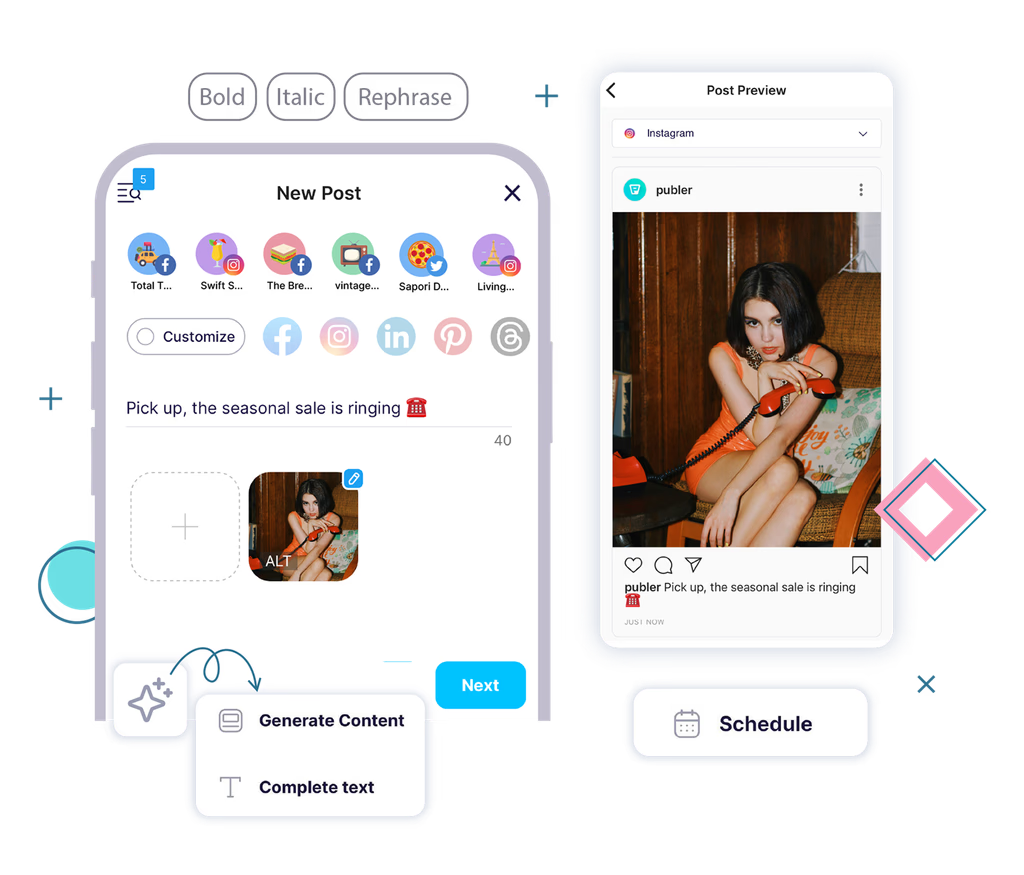
Get Creative Support with AI Assist
Sometimes you know what you want to say but need help finding the words.
Use Publer’s AI Assist to generate caption ideas, rewrite your text, or explore a different angle. You can also generate images to accompany your content. Review and refine the results to match your brand, then continue preparing your post in the same app.
Already brainstorming in ChatGPT or Claude? Publer’s AI features also include a social media MCP, a separate connection that lets compatible AI assistants work with your Publer content and accounts. You can use it to turn a conversation into action, from preparing posts to exploring your results.
Follow our guide to set up Publer’s MCP server when you’re ready to connect your assistant. Explore our dedicated guides for connecting Publer to Claude and ChatGPT. Your mobile app is there whenever you want to check the plan or make a quick edit.


Keep Your Media Organized and Ready to Use
The right visual might already be in your Media Library.
Access your Workspace’s images and videos from the Publer app, browse your assets, and select what you need when creating a post.
Captured something for your next post? Upload images and videos directly from your phone to your Media Library. With unlimited media storage on Publer’s paid plans, you can keep your content ready to use without keeping every file on your phone.
Use folders to keep campaign visuals, product photos, and client content organized. Whether you’re preparing a week of posts or making a quick update, you can find your media without opening your laptop.
Your assets stay connected to your content workflow, making it easier to move from choosing a visual to scheduling the finished post.


Keep Teamwork Moving from Your Phone
A post needs approval. A teammate has a question. A client requests a change.
With Publer’s mobile collaboration features, you can respond without waiting to return to your desk.
Review and Approve Posts
Open posts awaiting your review and approve or decline them directly from the app.
Push notifications let you know when your approval is needed and when posts you’ve submitted are approved or declined, helping everyone stay informed.
Your social media approval workflow can keep moving even when your team isn’t in the same place. Review the content and give it the go-ahead from your phone. That last-minute approval doesn’t have to wait until you’re back at your laptop.
Keep Feedback Connected to the Content
Use internal notes to discuss a post right inside Publer.
Add, view, edit, and delete notes, and mention Workspace members when you need their input. Notifications help you keep up with feedback and mentions.
From a quick clarification to a requested revision, the conversation stays attached to the relevant post.
Manage Your Workspaces and Members
Switch between team workspaces to manage different brands, clients, or teams.
You can view Workspace members, add or remove them, and adjust their permissions directly from your phone. The actions available to you depend on your Workspace role.


Check Your Results and Plan Your Next Move
After your content goes live, see how it performed.
With Publer Analytics on mobile, you can review account and post performance, follow key metrics, and use those insights to inform your next posts.
Export reports in PDF or CSV format when you need to share results with your team or clients. You can also track competitors through Competitor Analysis to bring more context into your planning.
Available analytics and competitor data depend on your plan and the social networks you manage.
What Can You Do on Mobile vs. Desktop?
Planning a campaign at your desk and making a quick edit on your phone? That’s exactly the idea.
You can handle much of your everyday social media work in either version of Publer. Here’s a quick look at the features covered above:
| Feature | Mobile App | Desktop |
|---|---|---|
| Create and schedule posts | Yes | Yes |
| Save drafts and edit scheduled posts | Yes | Yes |
| Review your content calendar | Yes | Yes |
| Access and organize your Media Library | Yes | Yes |
| Generate text and images with AI Assist | Yes | Yes |
| Review approvals and internal notes | Yes | Yes |
| Check analytics and export reports | Yes | Yes |
| Prepare posts using app reminders | Yes | Yes |
| Receive publishing reminders and finish in the social app | Yes | Use your phone for this step |
Feature access depends on your plan, permissions, and connected networks.
Need a tour? Here’s how to use the Publer mobile app. Start with the features you use most often at your desk. You might be surprised by how much you can get done from your phone.
How Does the Publer App Compare to Other Social Media Apps?
If you’re choosing an app to manage social media on the go, think about what usually sends you back to your laptop. Is it approvals? Finding the right media? Sending a client their report? Or inviting a teammate?
That’s where the details make a difference. Here’s how Publer’s mobile app compares:
- More room for native features. Publer lets you schedule posts via app reminders across all supported social networks, excluding WordPress. Buffer’s notification publishing currently covers Instagram, TikTok, YouTube, and Facebook Groups.
- A different caption for each network. Your LinkedIn post and Instagram caption don’t always need to say the same thing. Publer lets you customize posts for each network directly from your phone, while Metricool’s mobile app doesn’t currently support per-network editing.
- Reports you can send on the go. Client asking how things are performing? Export PDF or CSV analytics reports from the Publer app. Buffer’s mobile Insights lets you check performance, but exports require the web version.
- Team management from your phone. Add Workspace members and adjust their permissions in Publer. Hootsuite requires its web version for adding team members and managing the organization.
Feature access depends on your plan and permissions. But when work follows you away from your desk, having these tools in your pocket can save you a trip back to your laptop.


Bring Your Social Media Workflow with You
In a 2024 MeasuringU study, 92% of respondents used social media mobile apps, compared with 58% who used desktop websites. And according to Sensor Tower’s State of Mobile 2026 report, the average mobile user now spends more than 90 minutes a day in social media apps.
From your first idea to your next performance report, the Publer app helps you keep work moving beyond the desktop.
Create content, organize your media, plan your calendar, collaborate with your team, and choose how each post goes live, all from your phone.
Use automatic publishing when your content is ready to go, and app reminders when you want to add something extra natively.
More creative freedom. Same organized workflow.
Ready to give it a try? Download Publer on the App Store and take your next post from idea to scheduled, wherever you are.
Using Android? Your content plan can come with you, too. Keep your ideas, posts, and team feedback close at hand.
Get Publer on your Smartphone today!
Experience Scheduling even while on the go!


Publer Mobile App Features: FAQs
What Does the Publer App Do?
The Publer app lets you create and schedule social media posts, save ideas, organize media, collaborate with your team, and check your results from your phone. It helps you keep your content workflow moving wherever you are.
What Are App Reminders in Publer?
App reminders let you schedule a post you’ll finish publishing yourself. When it’s time, Publer sends a push notification. Tap it to save your media, copy your text, and open the social app, where you can add finishing touches and publish.
Is the Publer App Free?
Yes, the app is free to install. Publer’s Free plan includes three social accounts, excluding X, and up to 10 scheduled posts per account. Features such as analytics and AI Assist depend on your subscription. See Publer’s plans for current limits and pricing.
Is the Publer App Available for iPhone and Android?
Yes! You can get Publer on the App Store for iPhone and on Google Play for Android. Sign in to your Publer account to keep managing your content from your phone.
Can I Add Music or Stickers to Posts Scheduled with Publer?
Yes! Schedule your post using app reminders, then add music, stickers, or other available native features in the social app when it’s time to publish. You complete the final publishing step yourself. Options vary by account, network, and post format.
Can I Approve Posts from My Phone?
Yes. Open posts awaiting review in the Publer app and approve or decline them directly from your phone. You’ll need a plan and Workspace permissions that include approvals.
Can I Use Publer on PC?
Yes. You can use Publer in your PC’s web browser to create, schedule, and manage content. Switch to the mobile app whenever you need to work on the go or finish publishing a post through app reminders.